Summary: OST and PST are both data files of Outlook, but due to certain circumstances, like the crash of the Exchange server, lead users to convert OST to PST file. So in this blog, we have covered some tips and tricks to make the file conversion.
OST file is formed when a user creates their new Outlook profile irrespective of the fact that Outlook is configured using Outlook.com, IMAP, Exchange Server, etc. It is saved on user systems that reflect the user data but work with the synchronization of the Exchange Server.
At the time when the OST file is inaccessible due to any issues, then many users look to convert OST to PST. However, some users might face difficulties while dealing with the conversion approach. So to make it easier for users to make the conversion, we have shared some insights on the solution.
Why does the user look to convert OST file into PST?
Multiple reasons which make users to think of converting their OST file.
Sometimes the user needs to look to access their data from the OST file into Outlook, but they cannot directly import OST to Outlook, so due to this limitation converting them into PST will solve their problem. Many times the user wants to share the data with another team within as well as outside their premises.
To isolate from a situation where there is no accessibility of data due to an Exchange Server, many prefer to convert OST to PST.
You cannot move the OST file if you are looking for migration toward any other email client. As PST file is easily convertible many looks to move the data from the OST file into PST.
These are some of the reasons behind the intention to convert OST to PST, and now kindly take a look at a solution which have listed below.
Solution to Make the Conversion of OST into PST
After looking at the reasons to make the conversion of OST files to PST files, kindly follow the solution which can help to easily do the required task. Here, we will let you know about the usage of the Outlook Import/Export wizard to import OST to Outlook PST file.
Convert OST file to PST Using Outlook Import/Export Option
The first method which we have covered is taking you through the Outlook Import/Export option to convert OST to PST file. So kindly follow the steps shared below:
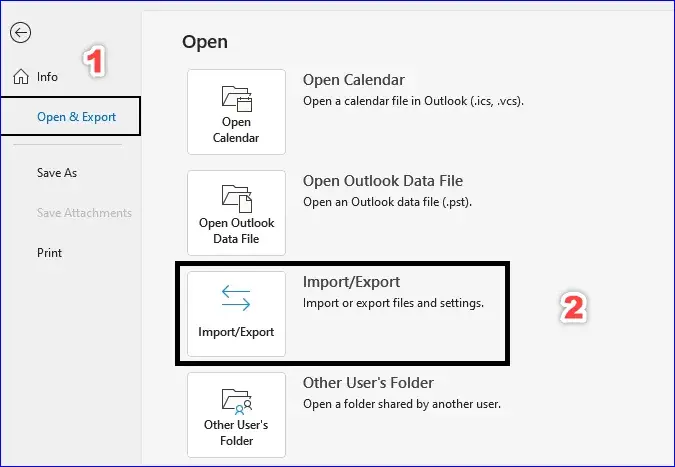
- After opening Outlook, make sure to select the Open & Export option from the Outlook menu. After that, choose Import/Export.
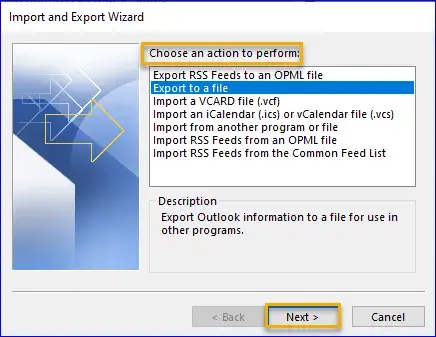
- Now the Import and Export wizard will pop up, where you will prompt to choose an action. Here select the Export to a file option and click on Next.
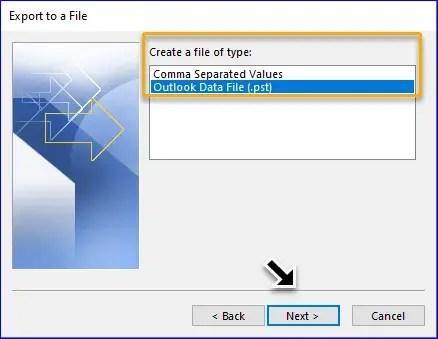
- Select which type of file you want. So make sure to pick up the PST file option and then hit on the Next button.
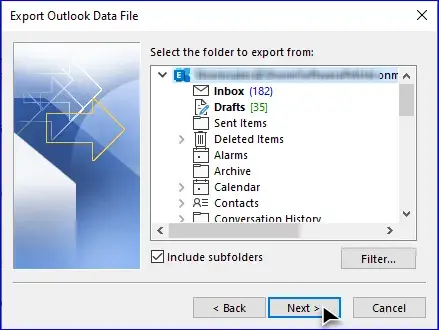
- Choose the folder to move in the PST file. Also, you can include the sub-folder. Once done, click on Next.
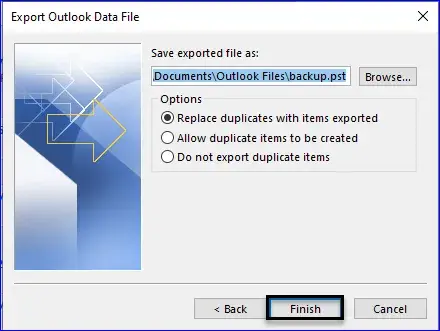
- Kindly select the location to save the PST file with the help of Browse. Don’t forget to select one option before clicking the finish button.
You May Read Also: Quick Way to Convert OST to EML Format Safely
Convert OST to PST via Outlook Archiving Method
MS Outlook provides another option to convert OST to PST, allowing you to move the mailbox items except for contact from the OST file into the PST file. Follow the listed procedure to start converting your OST file.
- Open Outlook and make click on File. Click on Options and then on the Advanced option. Once done then, click on AutoArchive Settings.
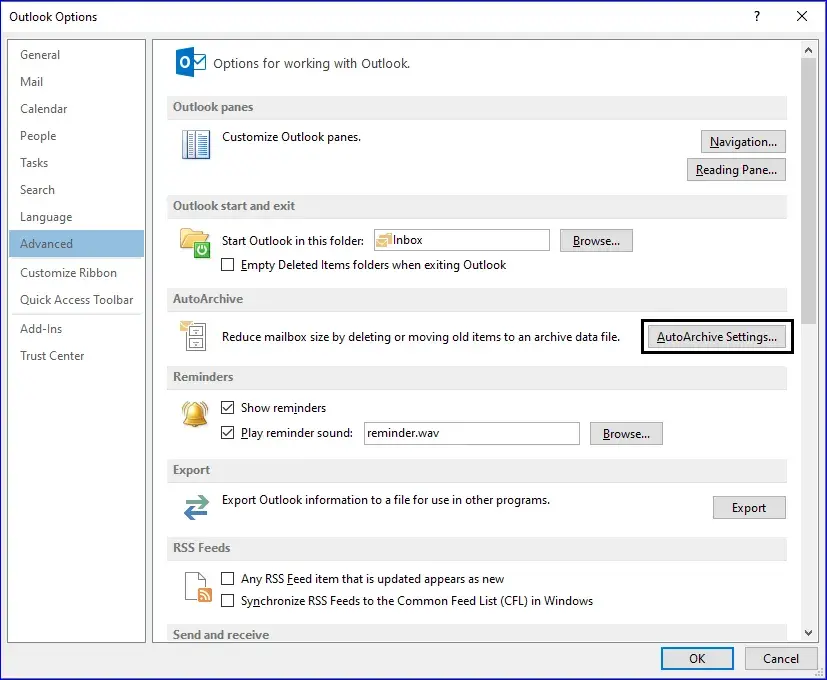
- Now a new window will appear which will let you make the customization. Set AutoArchive every 14 days. Through the Browse button, set the locations to save the file. Click on the OK button to finish the process.
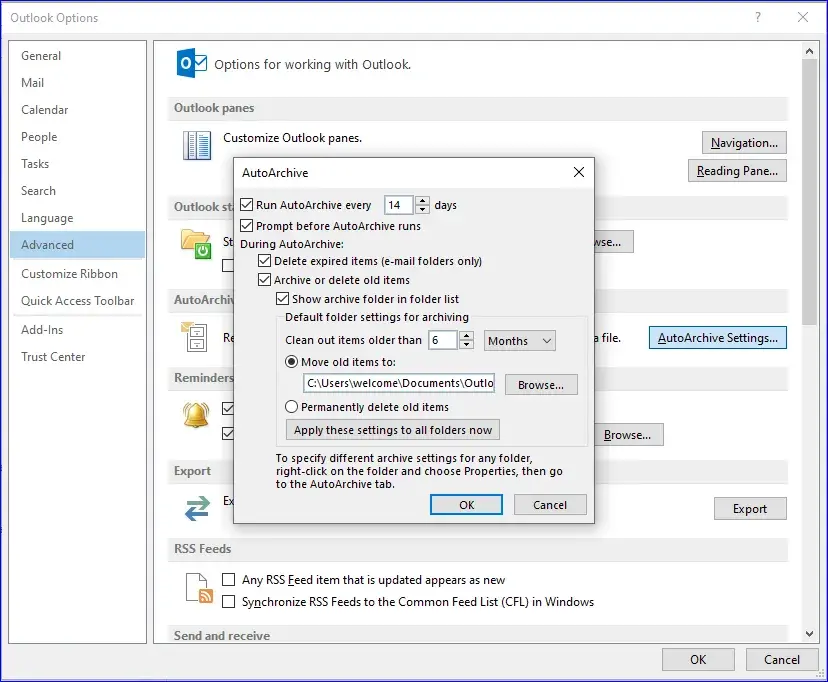
Once you have done the above-shared procedure, then, the data from the OST file will get moved to the PST file. But there are various risks associated with the listed solution.
- There are chances that the conversion will stop if the size of the OST file is large.
- It will take more time to complete the conversion and a mistake while doing the conversion can result in data loss.
- The conversion may result in corruption in the OST file.
You May Read Also: Quick Way to Convert OST to EML Format Safely
Prominent Solution to Convert OST files to PST
As far as the manual methods are concerned, they are quite lengthier and come with few limitations. Therefore, users should use different solutions to overcome the problem faced during the time of approaching manual methods. Shoviv OST to PST converter is one of the most recommended solutions to make a safe conversion.
It comes with a wide range of features to help users achieve the result on time. Due to its user interface, no user will face problems utilizing its functionality. This software is capable of converting multiple files at the same time. Users can also preview the added files item, which lets them ensure that only the correct data will go for conversion.
It also allows removing the non-required items because of its data filter option. Users can apply for the given filter criteria to make changes. One of its key options will help users whenever a user looks to resume the interrupted conversion. If the user applies an incremental option, this tool will only process the newer items.
Users can also download the demo version of this OST to PST converter free, which will allow examining the complete functionalities.
Ending Comments
Converting the OST file to the PST is a complex task if you are well-versed in the solution. However, there are certain solutions that will offer various downsides that user can avoid them. Instead of them, users can also look to convert OST to PST with the help of third-party software. Users can also try the trial version of the software listed above to learn about their real capabilities.